Learn what happens during each web project phase — from discovery and briefing to launch and maintenance — with key deliverables and decisions. (158 chars)
When someone commissions a website, they usually picture the process starting with design and ending with hitting “publish.” The reality is far more structured: the web project phases of any professional build follow a logical sequence where each stage shapes the next. Understanding that sequence doesn’t just help manage expectations — it helps you make smarter decisions before spending a single dollar.
Table of Contents
- Why Knowing the Phases Matters Before You Start
- Phase 1: Discovery and Briefing
- Phase 2: Planning and Information Architecture
- Phase 3: UX Design and Prototyping
- Phase 4: Content Production
- Phase 5: Technical Development
- Phase 6: Testing and Quality Assurance
- Phase 7: Launch and Go-Live
- Phase 8: Maintenance and Ongoing Evolution
- What Sets a Well-Managed Project Apart
This article breaks down each web project phase with its real deliverables, the critical decisions it involves, and the most common mistakes made by those who skip steps. This isn’t a generic agency framework — it’s what actually happens in mid-size and complex projects.
Why Knowing the Web Project Phases Matters Before You Start
The Standish Group’s project management CHAOS Report has spent decades documenting that failed software projects share one pattern: poorly defined requirements at the outset. Web development is no different. When the client and the team aren’t clear on what happens at each stage, scope changes arrive late, budgets blow out, and deadlines are missed as a rule rather than an exception.
Knowing the phases also lets you pinpoint exactly where things went wrong when a project starts to derail — and act before the problem bleeds into the next stage, where fixing it costs exponentially more.
Phase 1: Discovery and Briefing
Every web project starts with a conversation, but the briefing isn’t a simple sales call. This is the phase where the client’s business is thoroughly documented — including concrete goals (not “I want a nice website,” but “I want to cut order processing time by 40%”), the target audience, key competitors, and any technical or budget constraints.
The deliverables at this stage are: a briefing document signed off by both parties, a prioritized feature list (MVP), and — on more complex projects — a basic competitive analysis. Without a signed document, any future disagreement about scope is impossible to resolve fairly.
Common mistake: confusing the briefing with the commercial proposal. They’re two separate documents with two separate purposes. The briefing defines the what; the proposal defines the how much and the how.
Phase 2: Planning and Information Architecture
With the briefing locked in, technical and strategic planning begins. This is where the site’s structure is decided: which pages will exist, how they relate to each other, and what user flows will lead visitors toward conversion points. The output is a sitemap and, on projects with complex functionality, flow diagrams for critical processes.

This is also the right moment to make foundational technology decisions: WordPress with a custom theme or a page builder? WooCommerce or an external e-commerce solution? Does the site need to integrate with a CRM, ERP, or management system? These choices directly affect the budget, timeline, and long-term scalability of the site.
The primary deliverable is an information architecture document containing the approved sitemap and documented technology decisions. Changing the core technology stack during the development phase carries an enormous cost — this phase prevents that from happening.
Phase 3: UX Design and Prototyping
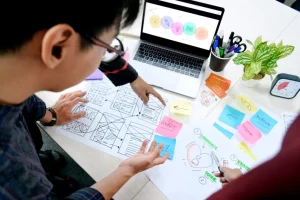
Design in a professional web project doesn’t start with picking colors. It starts with wireframes: black-and-white schematics that define how elements are arranged on each screen, free from visual distractions. The goal is to validate that the content structure and user flows are correct before investing any time in visual design.
Once the wireframes are approved, high-fidelity mockups are produced incorporating the client’s visual identity — typography, colors, and real UI components. On projects with multiple screen types or complex interactions, an interactive prototype (built in a tool like Figma) can be created to test the experience before writing a single line of code.
Common mistake: jumping straight to visual design without wireframes. The result is almost always endless revision rounds, because the client didn’t know what they wanted until they saw it on screen.
Phase 4: Content Production
This is the most underestimated phase — and the one that causes the most delays on web projects. Content (copy, images, videos, downloadable documents) needs to be ready before development begins, not during or after.
In practice, many projects kick off development with placeholder content (“Lorem Ipsum”), only to discover that the real content doesn’t fit the designed modules: a text block is too long and breaks the layout, an image has the wrong aspect ratio, or an entire section is missing because the client never anticipated it in the briefing.
The deliverable here is a complete content inventory: what exists, what’s missing, who’s responsible for delivering it, and by what date. Treating this as a formal phase with committed deadlines is the difference between a project that ships on time and one that drags on indefinitely.
Phase 5: Technical Development
With approved designs and content in hand, development begins. On WordPress projects, this phase covers theme templating or custom theme creation, functionality implementation (plugin configuration or custom plugin development), third-party integrations, and basic technical optimization: page load speed, semantic HTML structure, and cache configuration.
Development never happens directly on the production server. Work takes place in a staging environment — a copy of the site on a subdomain or separate server where the client can review progress without any impact on a live site. This is standard practice on any professional project.
The deliverables from this phase are a fully functional site in staging, properly documented and with all features tested internally. Software testing isn’t a separate phase on smaller projects — it happens continuously throughout development.
Phase 6: Testing and Quality Assurance
Before launch, the site goes through a systematic testing cycle. This goes well beyond “does it look right on mobile.” A professional QA checklist covers:
- Functional testing: all forms submit correctly, payments process successfully, and user flows work end to end.
- Compatibility testing: the site works correctly in Chrome, Safari, Firefox, and Edge, and on the devices most commonly used by the target audience.
- Performance testing: load time under 3 seconds on average mobile connections, with acceptable Core Web Vitals scores.
- Basic security testing: correct file permissions, active SSL, and security headers properly configured.
- Technical SEO review: meta tags, URL structure, canonicals, robots.txt, and XML sitemap.
This phase produces an issue list ranked by severity. Critical issues block the launch; minor ones can be scheduled for after go-live.
Phase 7: Launch and Go-Live
The launch isn’t a single moment — it’s a process. It involves migrating the site from staging to the production server, updating DNS records (with the propagation time that entails, typically between 2 and 48 hours), verifying that everything works in the new environment, and announcing the launch through relevant channels.
If the project replaces an existing site, the launch also includes setting up 301 redirects from old URLs to new ones, to preserve search rankings and avoid a flood of 404 errors. This step gets forgotten far more often than it should.
Phase 8: Maintenance and Ongoing Evolution
A website isn’t a product you deliver and forget. WordPress and its plugins receive regular security updates; content needs periodic review; integrations with external services can break when those services update their API. Maintenance isn’t optional — it’s the difference between a site that keeps performing two years from now and one that quietly accumulates vulnerabilities and technical debt.
This phase is also where real performance data from Analytics is reviewed: which pages convert, where users drop off, which content drives the most traffic. That data feeds the next iteration of the site, closing the loop on continuous improvement.
What Sets a Well-Managed Web Project Apart
The difference between a web project delivered on time and on budget and one that isn’t rarely comes down to technology. It comes down to whether the phases are respected, whether each stage’s deliverables are formally approved before moving forward, and whether the client understands which decisions are theirs to make — and when.
Skipping the briefing because “we know each other” or diving into design without an approved sitemap are shortcuts that occasionally work on simple projects — but on complex ones, they end up costing more time than they ever saved.
If you’re planning a web project and want to understand how these phases apply to your specific situation, the WordPress development services page explains how work is structured on real projects.
Need help with your project? I work with businesses and agencies on WordPress, WooCommerce, AI and integrations. Get in touch and we can discuss it.